
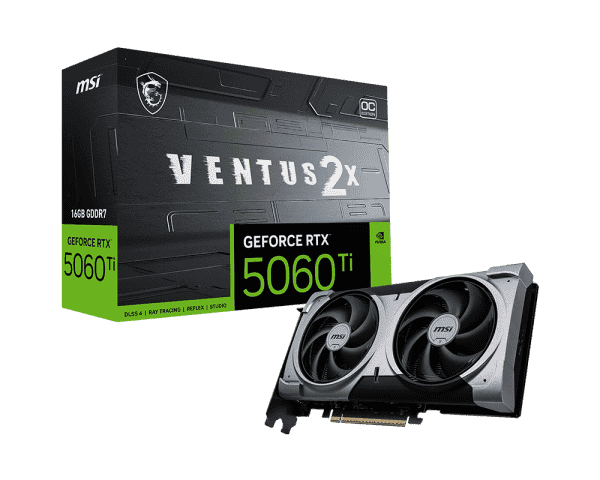
Understanding Graphics Cards: The Heart of Visual Computing Leave a comment
In today’s digital world, graphics cards — often called GPUs (Graphics Processing Units) — are among the most important components in a computer. Whether you’re a gamer, designer, video editor, or AI enthusiast, the graphics card plays a vital role in how your system performs. But what exactly does a graphics card do, and how do you choose the right one for your needs? Let’s explore everything you need to know about this powerful piece of hardware.
What is a Graphics Card?
A graphics card is a specialized hardware component that handles the rendering of images, videos, and animations on your display. Instead of letting the CPU (Central Processing Unit) handle all the heavy visual tasks, the GPU takes over those processes, delivering smoother graphics, faster rendering, and enhanced visual detail.
Modern GPUs come with dedicated memory (VRAM), powerful cooling systems, and thousands of processing cores. This allows them to execute complex calculations simultaneously — a process essential for high-quality visuals and real-time rendering.
Types of Graphics Cards
Graphics cards generally fall into two main categories:
1. Integrated Graphics
Integrated graphics are built into the CPU or motherboard. They share system memory (RAM) and are suitable for everyday tasks like web browsing, watching videos, and light productivity work.
Example: Intel UHD Graphics and AMD Radeon Vega integrated chips.
Integrated GPUs are cost-effective and energy-efficient but not ideal for gaming or heavy rendering tasks.
2. Dedicated Graphics Cards
Dedicated GPUs are separate components installed into the motherboard via a PCIe slot. They come with their own VRAM and power source, designed for intensive workloads like gaming, 3D modeling, or video editing.
Example: NVIDIA GeForce RTX and AMD Radeon RX series.
Dedicated cards deliver significantly higher performance and better visuals — the choice for gamers, creators, and professionals.
How a Graphics Card Works
When you play a game or render a video, your computer needs to generate thousands of images per second. The GPU breaks down this process into smaller parallel tasks, performing millions of mathematical calculations to determine how each pixel should look.
Here’s a simplified breakdown of how it works:
- Data Input – The CPU sends graphical data (textures, lighting, geometry) to the GPU.
- Processing – The GPU’s cores process the data using shaders and rendering pipelines.
- Output – The final image is sent to the display through HDMI, DisplayPort, or other outputs.
This process happens in milliseconds, giving you seamless graphics whether you’re gaming at 4K or editing a 3D animation.
Key Components of a Graphics Card
A graphics card contains several critical components that work together:
- GPU Chip: The main processor that handles rendering and computation.
- VRAM (Video Memory): Stores textures, frame buffers, and data for fast access.
- Cooling System: Fans or liquid cooling to prevent overheating.
- Power Connectors: Supply the extra power needed for high-performance GPUs.
- Ports: HDMI, DisplayPort, or DVI for connecting monitors.
High-end cards often feature RGB lighting, metal backplates, and multiple fans for aesthetics and durability.
Popular GPU Brands
The two main players in the GPU market are NVIDIA and AMD, with Intel recently joining the scene.
- NVIDIA GeForce: Known for top-tier performance, real-time ray tracing, and AI-driven graphics features like DLSS (Deep Learning Super Sampling).
- AMD Radeon: Offers great performance-per-dollar and innovations like FidelityFX Super Resolution (FSR) for enhanced visuals.
- Intel Arc: A newer player providing solid mid-range options and competitive pricing.
Choosing the Right Graphics Card
When selecting a GPU, consider your usage needs and budget:
For Gamers:
- Prioritize higher clock speeds, VRAM, and ray tracing support.
- Cards like the NVIDIA RTX 4070 or AMD RX 7800 XT deliver excellent 1440p and 4K performance.
For Creators and Designers:
- Look for cards optimized for 3D rendering, video editing, and AI workloads, such as the RTX 4090 or Radeon PRO series.
For Everyday Users:
- If you just browse, stream, or use office applications, integrated or budget GPUs like GTX 1650 are sufficient.
Always balance performance, power requirements, and your system’s cooling capabilities.
Trends in Modern GPU Technology
The world of GPUs is evolving rapidly. Modern cards are equipped with AI accelerators, hardware ray tracing, and energy-efficient architectures. NVIDIA’s Ada Lovelace and AMD’s RDNA 3 technologies push the limits of performance while improving power efficiency.
Additionally, GPUs are now essential beyond gaming — in fields like machine learning, cryptocurrency mining, and scientific simulations, where parallel processing offers incredible speed advantages.
Cloud gaming and GPU virtualization are also gaining popularity, allowing users to access high-end graphics performance remotely without expensive hardware.
Maintaining Your Graphics Card
To ensure your GPU performs optimally:
- Keep your drivers updated through official software (like NVIDIA GeForce Experience or AMD Adrenalin).
- Regularly clean dust from fans and heat sinks.
- Monitor temperatures to prevent overheating.
- Ensure proper airflow inside your PC case.
A well-maintained GPU can last for years and deliver consistent performance.
Conclusion
The graphics card is the visual powerhouse of modern computing — driving everything from gaming and design to AI and data science. Understanding its components, capabilities, and maintenance can help you make smarter upgrade decisions and get the most out of your PC.
Whether you’re aiming for immersive 4K gaming, faster video rendering, or AI-driven creativity, investing in a quality GPU is the key to unlocking your system’s true potential.
